Prepare for SQL Coding
mysql> create database xyz;
Query OK, 1 row affected (0.00 sec)

mysql> use xyz;
Database changed
mysql> CREATE TABLE Course (
    ->   CrsCode varchar(7),
    ->   DeptId varchar(3),
    ->   CrsName varchar(30),
    ->   Descr varchar(100),
    ->   PRIMARY KEY (CrsCode),
    ->   UNIQUE (DeptId, CrsName)
    -> );
Query OK, 0 rows affected (0.01 sec)

mysql> desc Course;
+---------+--------------+------+-----+---------+-------+
| Field   | Type         | Null | Key | Default | Extra |
+---------+--------------+------+-----+---------+-------+
| CrsCode | varchar(7)   | NO   | PRI | NULL    |       |
| DeptId  | varchar(3)   | YES  | MUL | NULL    |       |
| CrsName | varchar(30)  | YES  |     | NULL    |       |
| Descr   | varchar(100) | YES  |     | NULL    |       |
+---------+--------------+------+-----+---------+-------+
4 rows in set (0.00 sec)

mysql> INSERT INTO Course VALUES('CSCI001', 'CS', 'BIG DATA I', 'Introduction to Big Data');
Query OK, 1 row affected (0.01 sec)

mysql> INSERT INTO Course VALUES('CSCI002', 'CS', 'Programming Languages', 'Formal definition of programming languages');
Query OK, 1 row affected (0.00 sec)

mysql> SELECT * FROM Course;
+---------+--------+-----------------------+--------------------------------------------+
| CrsCode | DeptId | CrsName               | Descr                                      |
+---------+--------+-----------------------+--------------------------------------------+
| CSCI002 | CS     | Programming Languages | Formal definition of programming languages |
| CSCI001 | CS     | BIG DATA I            | Introduction to Big Data                   |
+---------+--------+-----------------------+--------------------------------------------+
2 rows in set (0.00 sec)

mysql> CREATE TABLE Professor (
    ->   Id integer PRIMARY KEY,
    ->   Name varchar(25),
    ->   DeptId varchar(3)
    -> );
Query OK, 0 rows affected (0.00 sec)

mysql> DESC Professor;
+--------+-------------+------+-----+---------+-------+
| Field  | Type        | Null | Key | Default | Extra |
+--------+-------------+------+-----+---------+-------+
| Id     | int(11)     | NO   | PRI | NULL    |       |
| Name   | varchar(25) | YES  |     | NULL    |       |
| DeptId | varchar(3)  | YES  |     | NULL    |       |
+--------+-------------+------+-----+---------+-------+
3 rows in set (0.01 sec)

mysql> INSERT INTO Professor VALUES (1, 'Weitian Tong', 'CS');
Query OK, 1 row affected (0.00 sec)

mysql> CREATE TABLE Teaching (
    ->   ProfId integer,
    ->   CrsCode varchar(7),
    ->   Semester varchar(6),
    ->   PRIMARY KEY (CrsCode, Semester),
    ->   FOREIGN KEY (CrsCode) REFERENCES Course (CrsCode),
    ->   FOREIGN KEY (ProfId) REFERENCES Professor (Id)
    -> );
Query OK, 0 rows affected (0.00 sec)

mysql> desc Teaching;
+----------+------------+------+-----+---------+-------+
| Field    | Type       | Null | Key | Default | Extra |
+----------+------------+------+-----+---------+-------+
| ProfId   | int(11)    | YES  | MUL | NULL    |       |
| CrsCode  | varchar(7) | NO   | PRI | NULL    |       |
| Semester | varchar(6) | NO   | PRI | NULL    |       |
+----------+------------+------+-----+---------+-------+
3 rows in set (0.00 sec)

mysql> INSERT INTO Teaching VALUES(1, 'CSCI001', 'S2023');
Query OK, 1 row affected (0.00 sec)

mysql> SELECT * FROM Teaching;
+--------+---------+----------+
| ProfId | CrsCode | Semester |
+--------+---------+----------+
|      1 | CSCI001 | S2023    |
+--------+---------+----------+
1 row in set (0.00 sec)
Questions
Problem 1 (10 points)
Carefully review the previous section titled “Prepare for SQL Coding.”
Execute all SQL commands provided in the example. Then, populate the three tables
(Professor, Course, and Teaching) with your own sample data.
You may freely create realistic values for professors, courses, departments, and other attributes.
Insert several rows into each table.
-
Primary key constraint violations.
For each table, attempt to violate its primary key constraint by inserting a row that duplicates an existing primary key value. Capture a screenshot of the MySQL error message generated in each case. You should submit three screenshots in total—one for each primary key violation. -
Foreign key constraint violations.
Attempt to violate each foreign key constraint by inserting data that references non-existent rows in the parent tables. Capture a screenshot of the MySQL error message for each violation. You should submit two screenshots in total—one for each foreign key violation.
-
Submit
Q1-screenshots.docxorQ1-screenshots.pdfcontaining five screenshots (three primary key violations and two foreign key violations). -
Submit
Q1.sqlorQ1.txtcontaining all SQL source code used in this problem.
Problem 2 (40 points)
Carefully review the requirements in this problem before starting. You will use SQL Data Definition Language (DDL) to define the schema for a fragment of a Student Registration System in MySQL.
The system consists of the following relations, along with their keys and integrity constraints:
Student (Id: INTEGER, Name: STRING, Address: STRING, Status: STRING)
Key: {Id}

Professor (Id: INTEGER, Name: STRING, DeptId: STRING)
Key: {Id}

Course (DeptId: STRING, CrsCode: STRING, CrsName: STRING, Descr: STRING)
Key: {CrsCode}
Unique: {DeptId, CrsName}

Transcript (StudId: INTEGER, CrsCode: STRING, Semester: STRING, Grade: STRING)
Key: {StudId, CrsCode, Semester}

Teaching (ProfId: INTEGER, CrsCode: STRING, Semester: STRING)
Key: {CrsCode, Semester}
Your schema definition must include the following foreign key constraints:
Transcript(StudId) references Student(Id)
Transcript(CrsCode) references Course(CrsCode)
Teaching(ProfId) references Professor(Id)
Teaching(CrsCode) references Course(CrsCode)
Transcript(CrsCode, Semester) references Teaching(CrsCode, Semester)
You may define the schema in an existing database or in a new database of your choice. You are free to select appropriate data types and attribute lengths for all fields.
Execute the DESC command for each of the five tables
(Student, Professor, Course,
Transcript, and Teaching).
Take a screenshot of the output for each table.
-
Submit
Q2-screenshots.docxorQ2-screenshots.pdfcontaining five screenshots—one for theDESCoutput of each table. -
Submit
Q2.sqlorQ2.txtcontaining all SQL source code used to create the database schema.
Problem 3 (50 points)
In this problem, you will write and test SQL queries using a given database instance.
The database instance is illustrated in the following figure:
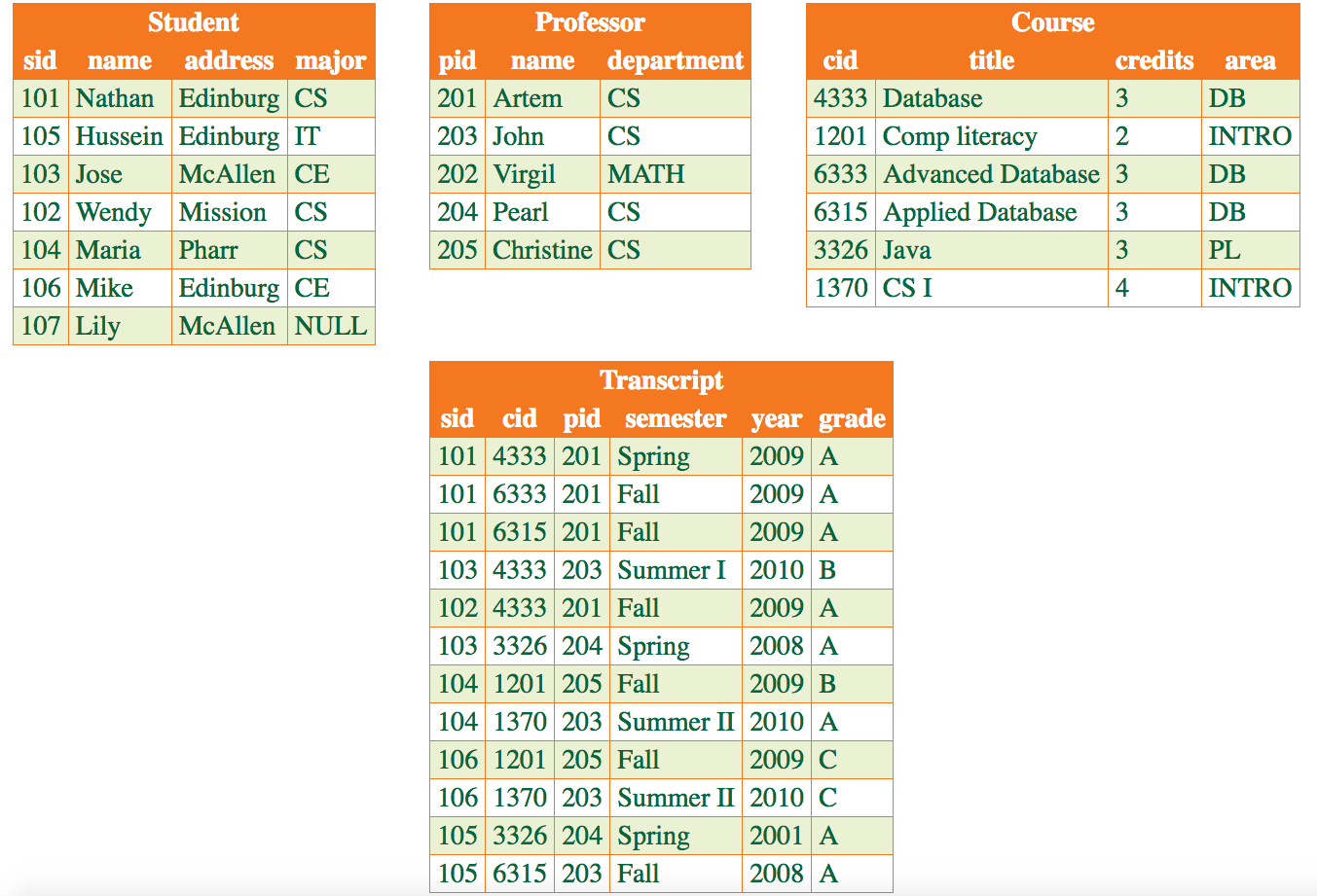
Create the database in MySQL using the provided file
mysqluniversity.sql.
Run the following command in a terminal:
mysql -u username -p < mysqluniversity.sql
Replace username with the MySQL user you have configured
(e.g., root). Enter your password when prompted.
After the database has been created successfully, write SQL queries to answer the questions listed below. For each query, execute it in MySQL and verify that the output is correct.
- Find the identifiers of all CS students who live in Edinburg.
- Find all possible pairs (combinations) of students and professors.
- Find all possible pairs (combinations) of CS students and CE students.
- Find the course identifiers of all courses taken by the student named Nathan.
- Find the course titles of all courses taken by the student named Nathan.
- Find the course titles and professor names for all courses taken by the student named Nathan.
- Find the names of all students who took at least one course taught by the professor named Artem.
- Find the names of all professors who have taught at least one course.
- Find the ids of all students who are majoring in CS or IT.
- Find the total number of credits completed by the student with ID 101.
-
Submit
Q3-screenshots.docxorQ3-screenshots.pdfcontaining ten screenshots—one for the result of each query. -
Submit
Q3.sqlorQ3.txtcontaining all SQL queries used to answer this problem.
Submission Requirements
- All files must be submitted electronically through Folio.
Screenshot Organization (Important)
- Screenshots must be clearly organized and labeled.
- For each problem, screenshots should appear in the same order as the questions are listed in the assignment.
- For Problem 3, the ten screenshots must be placed in exact order from Query 1 to Query 10, with each screenshot corresponding to the matching query.
- Each screenshot should clearly display both the executed SQL statement and its resulting output in MySQL.
Submission Checklist
SQL-Coding-Submission/
├── Q1-screenshots.docx or Q1-screenshots.pdf
├── Q2-screenshots.docx or Q2-screenshots.pdf
├── Q3-screenshots.docx or Q3-screenshots.pdf
│     (Screenshots for Problems 1, 2, and 3 respectively,
│      organized and ordered according to the problem statements)
├── Q1.sql or Q1.txt
├── Q2.sql or Q2.txt
└── Q3.sql or Q3.txt
      (SQL source code files for Problems 1, 2, and 3)
Submissions with missing, mislabeled, or out-of-order screenshots—especially for Problem 3—may receive reduced credit.
Note: This is an individual coding assignment.